How do favorite job titles help match me with opportunities?
Last updated About 2 months ago
Favorite job titles let your WBL coordinator know what kind of work you're interested in, so opportunities that fit can be highlighted and recommended to you — even if the exact wording of the job title is different from what you typed.
You manage favorites from My Preferences → Favorite Jobs on the Opportunity Search page (or your WBL student page). The heading reminds you: "We'll use these to help match you with opportunities."

Two ways to add a favorite
Search an O*NET occupation. Use the O*NET occupation search box to find an official occupation (for example, "Registered Nurse" or "Web Developer") and click Add.
Type any job title. If you don't see an exact match, type a title into the Any job title box (for example, "Software Developer") and click Add.
Under Opportunity Search. You can click the Heart icon on any opportunity to automatically favorite its job title.

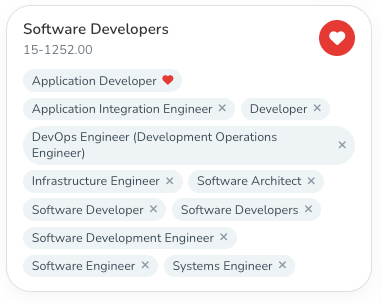
Your favorites appear as cards below, each with a heart icon you can click to remove that favorite.
Automatically favoriting titles you're interested in
Check the box Automatically favorite job titles when I express interest in an opportunity if you'd like a job title added to your favorites automatically every time you click I'm Interested on an opportunity. If you leave this off, you'll be asked each time whether you want to favorite the title (with an option to stop being asked).

Why titles don't have to match exactly
You might wonder why favoriting "Software Developer" also lights up an opportunity titled "Programmer" or "Junior Software Engineer." Here's the plain-language version of how that works:
Every occupation has a SOC code — think of it as a "career bin" that groups together job titles that all mean roughly the same occupation, even if employers word them differently.
When you favorite a title (or an opportunity is posted), it's quietly matched to the SOC "bin" it belongs to.
Related synonyms are matched too — other titles people commonly use for the same role, including different seniority levels (for example, "Lead Engineer," "Senior Engineer," and "Chief Engineer" are all treated as related).
Because of this, you don't need to guess the exact wording an employer used. Favoriting a general title is usually enough to catch opportunities with related titles.
Removing a favorite or one of its variations
Click the heart on a favorite card to remove that whole favorite.
If a favorite shows related "variation" titles as pills underneath it, you can remove just one variation without deleting the entire favorite — useful if one of the suggested synonyms isn't actually relevant to you.

Where favorites show up
On the Opportunity Search tab, the Favorited titles only filter shows opportunities that match one of your favorites.
In Recommended for You, favorites are one of several signals used to suggest opportunities.
Your WBL coordinator can also see which students have favorited a matching title when they use Match Candidates to fill an opportunity.